
Guide for restaurant owners
A PDF behind a QR code, or a real digital menu?
Both start with guests scanning a code at the table. What happens next is different, and so is the work for you. Here's how to choose, and how Menú QR, an Android app for restaurants, handles both.
Build my menu on Google Play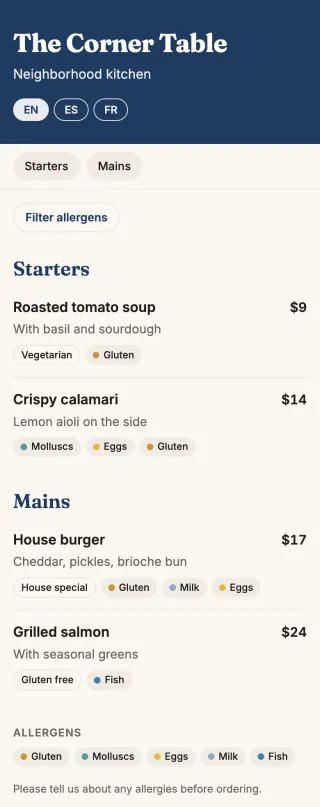
The short answer
If your menu rarely changes and you already have a good PDF, a QR code pointing to it is enough, and quick to set up. If prices move often, dishes sell out or you serve tourists, a menu built for phones will save you time and be easier for guests to read.
How they compare
| PDF behind a QR | Digital menu | |
|---|---|---|
| On a phone | Guests pinch and zoom a page made for paper | Text fits the screen, with section tabs |
| Changing a price | Edit the PDF and upload it again | Change it from your phone |
| Dish sold out | Stays on the menu | Mark it as sold out |
| Allergens | Whatever fits on the page | Tags on each dish |
| Languages | One PDF for each language | Translated versions, if your tool offers it |
| Setup time | Minutes, if the PDF exists | Depends on how many dishes you have |
When a PDF is the better choice
- Your printed menu is beautifully designed and that's part of your brand.
- It's a set menu for an event, used once.
- You have a very long list, such as a wine book, that you don't want to retype.
When a digital menu pays off
- You change prices or dishes more than a couple of times a year.
- Many guests don't speak your language.
- You need allergens that are easy to read and easy to keep up to date.
Either way
Keep some paper menus for guests who'd rather not use a phone. Print the code big enough, test it at the table, and add a line such as "Scan for the menu".
How Menú QR does both
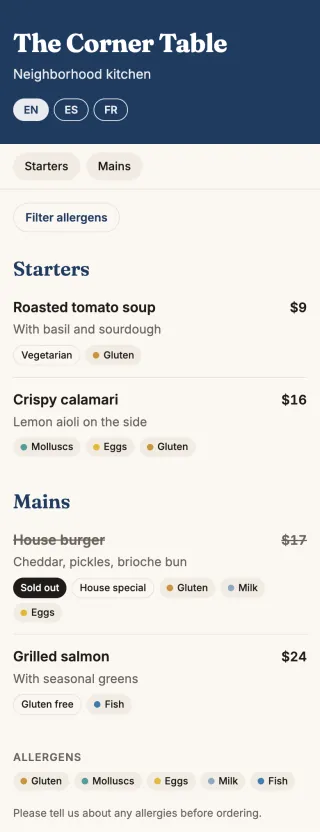
You build a digital menu in the app and it goes live as you save, or you turn your existing PDF or a photo of it into a code, paid per code or unlimited with PRO. This is what a change looks like on the digital menu: the calamari price and a sold-out burger, on the same printed code.
See what Menú QR includes. If you need a QR code for documents in general, not menus, there's also PDF QR Conversor.